How a Browser Works: A Beginner-Friendly Guide to Browser Internals
Exploring the assembly line of Browser internals

Ever wondered what Happens After you Type a URL and Press Enter?
If we look superficially , Browser instantly serves the website on a platter. But at the back, a pipeline of processes is executed chronologically. Let us enter the rabbit hole and excavate the browser internals!!
What exactly happens after you hit Enter on your keyboard?
You type a URL and press Enter →
- Browser understands the URL
Is it HTTP or HTTPS?
What domain is being requested?
- DNS lookup happens
- Browser asks: “What is the IP address of this domain?”
3. Connection is established
Browser establishes a network connection to the server
(TCP handshake, and TLS if it’s HTTPS)
- HTTP request is sent
- Browser asks the server for the page
- Server sends a response
- HTML, CSS, JavaScript, images, etc.
6. Browser starts processing the response
Parses HTML
Downloads additional resources
Applies CSS
Executes JavaScript
- Page is rendered on your screen
Pixels are painted
Page becomes interactive
This is the workflow that takes place when you hit enter for a URL . All of this happens in milliseconds. Today we are going to deep dive into “Step 6 “ and explore the internal processing of the browser.
What a Browser Actually Is (Beyond “It Opens Websites”)
When we say “the browser opens websites,” we massively underestimate what a browser actually does.
Don’t consider it as a middle man , interfacing a client and a server. A browser is much more than that.
A web browser is a software application designed to access, retrieve, and render web resources from the World Wide Web, such as HTML documents, images, and videos, turning them into an interactive, visual interface. BTW this turning of resources into interactive pages is what we are going to learn today!!So fasten you seatbelts , this is going to be a long flight .
Internally, it is made up of multiple specialized components layering on top of each other ,that work together:
A network layer to talk to servers
A parser to understand HTML and CSS
A JavaScript interpreter and a engine to execute code
A rendering engine to draw pixels
A security model to isolate websites
We can say that browser is a complex software platform, closer to a mini operating system
Tasks carried out by the browser in chronological order:
Fetches resources from the internet (like a chef fetching ingredients for preparing a meal)
Reads and understands HTML, CSS, and JavaScript (like reading three different languages)
Draws everything on your screen (like a sketch artist painting from instructions)
Lets you interact with what you see (like a responsive canvas)
This coordination is one of the hardest problems in browser design.
Main Parts of a Browser (High-Level Overview)

1. User Interface (UI)
As the name suggest , this is the page that user interacts with . It contains multiple elements which you must be familiar with . These are
Address bar
Back/forward buttons
Tabs
Bookmarks
Settings menus
The UI handles user input and forwards actions (like typing a URL or clicking a link) to the browser’s internal systems.
Users can easily control and navigate the browser using the UI .
Consider this as the remote control of a RC Car.
2. Browser Engine
The browser engine acts as the coordinator. It coordinates the flow of information between the user interface, rendering engine, and other browser components.
It is the responsibility of the the browser engine to ensures that user actions, such as clicking a link or entering a URL, are properly processed and trigger the appropriate actions within the browser.
Its basically :
Receive instructions from the UI
Decide when to load a page
Coordinate between the network, rendering, and JavaScript engines
You can think of it as the manager of the factory that keeps all parts working together.
3. Networking Layer
You would have guessed the function of this layer by now. This component handles communication of the browser with the internet.
The tasks which require to go out in the internet and fetch data are handled by this layer .
It is responsible for
DNS lookups —> resolving website URLs into IP addresses
Making HTTP/HTTPS requests to web servers.
Establishing network connections
Handling redirects
Managing caches and cookies
The networking component plays a crucial role in fetching web page resources, such as HTML, CSS, images, and other files, from servers and delivering them to the rendering engine for display.
Everything that goes in or out of the browser passes through this layer.
4. Rendering Engine
In fancy computer science words
render == display.
This engine displays the Webpage to the user, inside the browser. . This happens at the backstage by turning code into pixels.
It basically takes the fetched HTML, CSS, and JavaScript code of a web page and converts it into a visual display that users can see.
It:
Parses HTML into the DOM
Parses CSS into the CSSOM
Builds the render tree
Calculates layout
Paints and composites the page
Examples include Blink and WebKit.
5. JavaScript Engine
The JavaScript engine executes JavaScript code on the page.
All the tasks related to HTML and CSS are handled by Rendering Engine whereas that of JS are done by JS engine.
It:
Parses JavaScript
Compiles it (often just-in-time)
Executes it efficiently
Interacts with the DOM and browser APIs
Examples include V8 and SpiderMonkey.
6. Disk API
Browsers can store data locally: cookies, cache, localStorage, etc. This helps pages load faster on repeat visits.
High-Level Flow Summary
User Action
   ↓
Browser UI
   ↓
Browser Engine
   ↓
Network / Rendering / JS Engines
   ↓
Pixels on Screen
Browser Engine vs Rendering Engine
The common mistake beginners do is to mix up this two engines . Let us sort it all for now .
Browser Engine: The Operations Manager
The browser engine acts like the manager of the browser.
It doesn’t draw webpages or execute JavaScript itself. Instead, it:
Takes input from the browser UI (like typing a URL)
Decides what needs to happen next
Coordinates between different components
Controls page loading and navigation
So let our movie director be the BE .
He himself , doesn’t act in the movie
Doesn’t handle cameras or lighting
But decides what happens when and who does what.
Rendering Engine: The Painter
The rendering engine is responsible for turning code into visuals. It involves using high mathematical algorithms for the same.
It:
Parses HTML and CSS
Builds internal trees (DOM and CSSOM)
Calculates layout and styles
Paints pixels on the screen
Think of the rendering engine as the artist:
Takes instructions (HTML + CSS)
Carefully draws the final picture
Updates the screen when something changes
Pairing the up : How They Work Together
When you load a webpage:
The browser engine takes the URL from the user .
It determines , how the data should be processed? Who will process it and in what order?
Browser engine then asks the rendering engine to render it
The rendering engine draws the page
The browser engine manages updates, navigation, and lifecycle
Tabular Difference: Browser Engine vs Rendering Engine
| Aspect | Browser Engine | Rendering Engine |
| Primary Role | Coordinates browser operations | Renders webpages |
| Focus | Control and decision-making | Visual output |
| Handles UI input | Yes | No |
| Parses HTML/CSS | No | Yes |
| Draws pixels | No | Yes |
| Manages navigation | Yes | No |
| Examples | Part of Chromium, Gecko | Blink, WebKit |
From URL to Pixels: How a Browser Renders a Webpage
A browser doesn’t simply “draw” a page.
Internally, it:
Builds a DOM from HTML
Builds a CSSOM from CSS
Combines them into a render tree
Calculates layout (sizes and positions)
Paints and composites pixels
Every scroll, click, or animation can trigger parts of this pipeline again.
Lets see each step in detail.
Networking
When user enters a URL in the browser , it sends a DNS query to fetch the respective IP address.
Once the connection is established with the server , browser fetches the HTML code using a HTTP request..
What happens internally:
→ DNS lookup (domain → IP address)
→ TCP connection (3-way handshake)
→ TLS handshake (if HTTPS)
→ HTTP request sent to the server
Once the server receives the request, it sends an HTTP response to the browser containing the requested resource in HTML, CSS, and JavaScript code.
Mainly, the server, being a web server, returns HTML code, which in turn has linked JS and CSS files.
Nothing is rendered yet. The browser just received raw text.
HTML Parsing & DOM Creation
This is the first step of the rendering engine.
Parsing means taking the code we write as text (HTML, CSS) and transform it into something that the browser can work with. ie DOM
Now the browser has received the raw data bytes . The next step is to parse the data for DOM creation.
The Document Object Model (DOM) is the data representation of the objects that comprise the structure and content of a document on the web.
In simple terms DOM is a tree like structure created by the parser from the raw data.


Let us go step by step,
Tokenization - The first step of this parsing process is to break down the HTML into tokens that represent start tags, end tags, as well as attribute names and values..
This tokenization process is followed by DOM creation (tree creation).
As the HTML code is hierarchical in nature , that is elements nested inside elements , a tree is created.
<html>
  <body>
    <h1>Hello</h1>
    <p>Welcome</p>
  </body>
</html>
What the browser does:
Converts HTML into tokens
Builds a DOM tree
Each tag becomes a node
Resulting DOM:
Document
 └── html
     └── body
         ├── h1
         └── p
<!DOCTYPE html>
<html>
  <head>
    <link rel="stylesheet" href="style.css">
  </head>
  <body>
    <h1>Welcome</h1>
    <p>Hello, world!</p>
  </body>
</html>
During the parsing of the HTML document from top to bottom , parser finds some other files linked to the HTML document.
This can be (CSS ,JS, Images ).
So what the parser does is, it will request the browser to download those resources in the background and continue parsing.
Important
Parsing can continue when a CSS file is encountered
But
<script>elements (speaking about JS particularly ) those without anasyncordeferattribute ,block rendering, and pause the parsing of HTML. This problem or latency in rendering is handled by PRELOAD SCANNER.
Understanding Parsing with an example.
Let us take an example of a mathematical operation carried out by the computer.
When a computer sees 6 + 8 * 2, it needs to parse it (you can visualise parsing as self interpretation for the computer):
First, it identifies the pieces: numbers (6, 8, 2) and operators (+, *)
Then it understands the structure: multiplication happens before addition
Finally, it calculates:
8 * 2 = 16, then16 + 6 = 22

The browser does the same thing with HTML, but instead of math, it's building a structure.
CSS Parsing & CSSOM Creation

The image above shows everything that happens with CSS in the browser from start to finish. It's there just for reference. We're going to zoom in on the first step, highlighted in pink, which is CSS parsing.
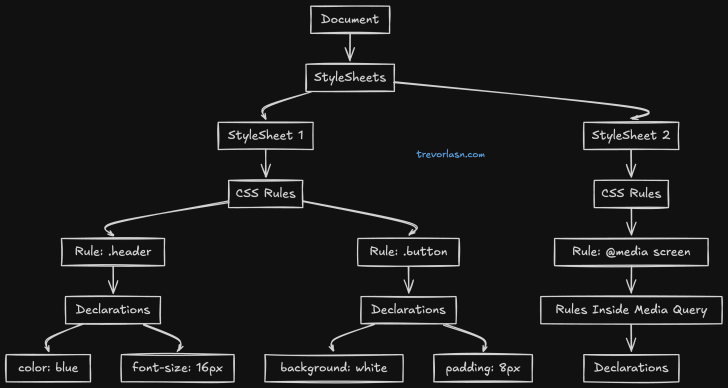
This is the second step of the rendering engine. Similar to the first step , it involves processing CSS and building the CSSOM tree.
CSSOM and DOM are having the same tree like structure with parent and children nodes.
Just as browser converted HTML into a tree for better interpretation , it maps the CSS rules into a similar format named CSSOM .
The browser goes through each rule set in the CSS, creating a tree of nodes with parent, child, and sibling relationships based on the CSS selectors.
The browser:
Parses CSS rules
Resolves inheritance and specificity
Builds the CSSOM (CSS Object Model)
The "Recalculate Style" in developer tools shows the total time it takes to parse CSS, and construct the CSSOM tree.
CSSOM represents styling rules, not structure. CSS is render-blocking (ie The browser waits for CSS before rendering to avoid flickering. )
DOM + CSSOM → Render Tree
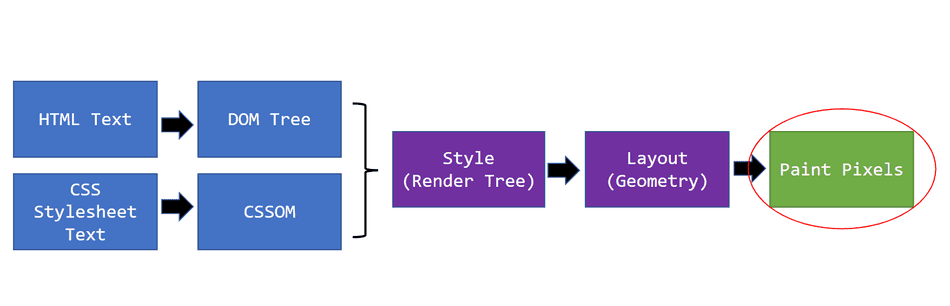
So till now we have got 2 trees , DOM and CSSOM .Merge them ! Easy
The render tree is a combination of the DOM and CSSOM, and represents everything that will be rendered onto the page.
Rendering steps include style, layout, paint, and in some cases compositing.
The construction starts with the root of the DOM tree, traversing each visible node.
Render tree will not include elements that aren't going to be displayed,
<head>element and its childrenNodes with
display: none, such as thescript { display: none; }in user agent stylesheets
Each visible node has its CSSOM rules applied to it.

This render tree is then used to compute the layout of every visible element.
Render tree creates only elements that are visible with computed style , on the screen
Example:
<head>→ not rendered<h1>→ rendered with color blue
Layout (Reflow): Calculating Positions

Now the we have a complete render tree browser knows what to render, but questions
“Where to render it?”
Therefore the layout of the page (i.e. every node's position and size) must be calculated. This means that calculating the size and location of each node of the render tree that is to be displayed on the viewport.
The rendering engine traverses the render tree, top to bottom calculating the coordinates at which each node should be displayed.
It calculates:
Width & height
Position (x, y)
Relative spacing
This step is called:
Layout
Or Reflow
Once that is complete, the final step is to take that layout information and paint the pixels to the screen.
And voila! After all that, we have a fully rendered web page!
Example:
h1 → x:10px, y:20px, width:300px
p  → x:10px, y:60px, width:300px
Painting & Display
Finally, the browser paints pixels.
Painting involves drawing every visual part of an element to the screen, including text, colors, borders, shadows, and replaced elements like buttons and images.
As painting needs to be done quickly with high speed, a GPU is used instead of a CPU.
Steps:
Paint backgrounds
Paint text
Paint borders
Layer compositing
GPU draws pixels on screen
This is when the page becomes visible.
Scrolling, animations, and hover effects may trigger:
Repaint (cheap)
Reflow (expensive)
Step 7: Display
When sections of the document are painted in different layers they overlapping each other.
So compositing is necessary, to ensure they are drawn to the screen in the right order and the content is rendered correctly.
Finally, the painted layers are composited together and displayed on your screen. You see the webpage!
All of this – from pressing Enter to seeing the page – typically happens in under a second, often in just a few hundred milliseconds.

The Entire Cycle
Here's the thing: this process doesn't just happen once. A small change in the in the webpage , the browser repeats the process each time . This repetition depends on what changed has been made and does not have to start from the beginning. Like
If JavaScript changes the DOM (adds an element), the browser builds a new render tree, does layout, and repaints
If JavaScript:
Modifies DOM → reflow + repaint
Modifies only color → repaint
Modifies layout → expensive reflow
If you resize the window, layout has to recalculate everything
If CSS changes (like a hover effect), the affected elements get repainted
Understanding this helps you write better code. For example, changing an element's color is cheap (just repaint), but changing its size is expensive (layout + repaint).

Final Mental Model
A browser is a pipeline, not a painter.
It fetches code, builds models, calculates geometry, and finally paints pixels.A huge amount of computations are involved while rendering a website .
………………………………………………………………………………………………………………………………………………………..


